EmbedEnglish Updated
Free number games for your website
Put free number practice games on your own site: 5 ready-to-embed games in 6 languages, plus 4 sourced statistics charts. Pick a game, see it on a sample page, copy the code. The games are practice, not a test: they show no score and no result. They need no sign-up and are free to use, including in a classroom or on a commercial site. Keep the small credit line under the game.
How to add a game to your page in three steps
Pick the game
Choose the game, the language and the size in the builder below. You see the real game on a sample page.
Copy the code
Two lines for the script version (it resizes itself and adds the credit line), or a plain frame if your site blocks scripts.
Paste it into your page
Use an HTML or embed block on your platform. Step-by-step cards for WordPress, Wix, Squarespace and more are further down.
Try it: pick a game, see it on a page, copy the code
The grey bars stand for your own page. The dashed box is the real game, running exactly as visitors will see it, and the line under it is the credit line that gets written into your page.
Paste this where the game should appear (recommended: resizes itself and adds the credit link for you)
<div data-dysc-game="dots"></div>
<script async src="https://dyscalculia.io/embed.js"></script>
Or the plain frame, if your site blocks scripts (the credit line is part of the code: paste both lines and keep it)
<iframe src="https://dyscalculia.io/embed/en/dots" title="Number game by Dyscalculia.io" width="480" height="578" style="border:0;width:100%;max-width:480px" loading="lazy"></iframe>
<p style="text-align:center;font:12px system-ui,sans-serif">Free number games by <a href="https://dyscalculia.io/">Dyscalculia.io</a></p>
Building an app? From npm (web component)
npm install dyscalculia-embed

import "dyscalculia-embed";

<dyscalculia-game game="dots" lang="en" size="standard"></dyscalculia-game>
React
import { Game } from "dyscalculia-embed/react";

<Game game="dots" lang="en" size="standard" />Your page
The game (runs in a frame)
Credit link, written into your page
Five games, 6 languages
Count the Dots
6 languagesDot patterns flash on the screen and the player taps how many there are, from 1 to 9. Five short rounds.
Try it in the builder ↑
Which is Bigger?
6 languagesTwo numbers side by side and the player taps the bigger one. Five short rounds, from single digits to two-digit numbers.
Try it in the builder ↑
Which Group Has More?
6 languagesTwo groups of dots and the player taps the side with more. No counting needed: it is about a feel for quantity.
Try it in the builder ↑
Place the Number
6 languagesA number appears and the player slides a marker to where it belongs on a line from 0 to 100. Three rounds.
Try it in the builder ↑
Remember the Digits
6 languagesA few digits appear one at a time, then disappear, and the player types them back in order. Three rounds that get longer.
Try it in the builder ↑
These are the same five game screens as in the free screening test, played as practice: nothing is scored or stored, and there is no result.
Embed a statistics chart
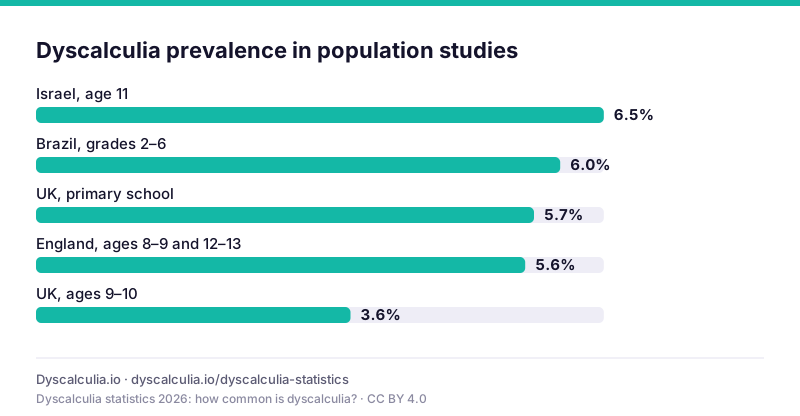
The charts on the dyscalculia statistics page can go on your site too, as a plain image with a visible source line. No script, no frame, no sign-up. Every number in a chart comes from a published study and carries its year on the statistics page. The compilation is licensed CC BY 4.0, so keep the source line under the chart.
HTML for your page (the source line under the chart is part of it)
<figure style="margin:0;max-width:800px"><a href="https://dyscalculia.io/dyscalculia-statistics#s-how-common-is-dyscalculia-chart"><img src="https://dyscalculia.io/data/dyscalculia-statistics-chart-1.svg" alt="Dyscalculia prevalence in population studies" width="800" style="width:100%;height:auto" loading="lazy"></a><figcaption style="font-size:13px">Source: <a href="https://dyscalculia.io/dyscalculia-statistics">Dyscalculia statistics 2026: how common is dyscalculia?</a>, Dyscalculia.io (CC BY 4.0)</figcaption></figure>Your page
The chart: an image with its source line, no script
Copy the HTML
It is one figure: the chart image, which links to the statistics page, and a source line under it.
Paste it in an HTML block
Any block that takes HTML works. No script is needed, so even platforms that strip scripts keep it.
Check the source line
It is part of the code and should stay visible. If your platform only takes an image, upload the chart's SVG and write the source line in the caption.
The same figures are also available as CSV and JSON; see developer tools.
Who puts them on their site
Teachers and tutors
A number game under the weekly maths topic on a class blog, or a link in a lesson page that children open on a tablet.
Schools and libraries
A maths corner page on the school site, in the language of your community, with nothing for families to sign up for.
Parent and education bloggers
A practice game or a chart next to an article about number sense, so readers can try what the article describes.
App and site makers
The web component and React wrapper on npm, for a site that is built with a framework.
How to add it on your platform
Copy the code from the builder above, then follow your platform. Each card says which version to paste and links straight to the platform's own help page. The steps come from those pages, read on 18 October 2026; menus and plan limits change, so use them as a guide. If a platform removes scripts, use the plain frame code and add the credit line by hand.
WordPress.com
Paste the script code- Open the post or page you want the game on and select the block inserter (+).
- Search for HTML and choose the Custom HTML block.
- Select Edit HTML if the block shows a preview, paste the code and select Update (or Publish).
- Open the live page, not the editor preview, to check the game and the credit line under it.
- If the code is gone after saving, your plan strips scripts: see the note below, then use the plain frame code or a link to the game page.
Good to know: Scripts and frames are kept only on a paid plan with hosting features active (the help page says a paid plan alone is not enough). On the free plan they are removed when you save, so link to the game page with a normal link instead. Self-hosted WordPress.org uses the same block name, but its rules were not verified from official documentation: check in your editor.
Wix
Paste the plain frame code- In the editor choose Add Elements → Embed Code → Embed HTML.
- Click Enter Code, paste the code and press Apply.
- Set the element width and height to 100% so the game is not cropped.
- Publish the site and open it over https to see the game.
Good to know: Only HTTPS addresses show once published.
Squarespace
Paste the script code- Edit the page and add a Code block (or an Embed block with a code snippet).
- In the Code block set the mode to HTML and paste the code.
- Save, then open the page in a private window to check it.
Good to know: Code blocks need a Core, Plus or Advanced plan; Embed blocks are on all plans. Code can be hidden while you are logged in, so test in a private window.
Google Sites
Paste the plain frame code- Open the page in the desktop editor.
- Choose Insert → Embed → Embed code.
- Paste the code, press Next, then Insert.
- Click Publish: the game only shows on the published site.
Good to know: JavaScript must sit inside script tags. Desktop editor only.
Carrd
Paste the script code- Add an Embed element to the page.
- Set Type to Code and Style to Inline.
- Paste the code and publish the site.
Good to know: Needs Pro Standard or higher. Nothing shows in the builder; publish to see it.
Notion
Paste the game address only- On your Notion page type /embed and pick Embed.
- Paste the game address (the https://… link from the builder's frame code, the src value).
- Press Embed link and drag the corner to resize.
Good to know: Notion takes an address only: no script, no pasted frame code, so no credit line is written. Add a normal link to the game page as a fallback.
Webflow
Paste the script code- Add a Code Embed element inside a container.
- Paste the code (leave out html, body and head tags).
- Preview, then publish.
Good to know: Needs a paid site plan. Read from help-center snippets: check in your editor.
Not fully confirmed from an official page: check in your editor.
Ghost
Paste the plain frame code- In the post editor type /html or add an HTML card.
- Paste the code.
- Publish and check the live page: the editor only shows a placeholder.
Good to know: Whether scripts run is not stated on the official page: check in your editor, and use the plain frame if the script is removed.
Not fully confirmed from an official page: check in your editor.
Shopify, Blogger, Weebly
Paste the plain frame code- Shopify: add a Custom Liquid or Custom HTML section.
- Blogger: add an HTML/JavaScript gadget.
- Weebly: drag in an Embed Code element.
- Paste the code and publish.
Good to know: Steps and limits could not be confirmed from the official pages: check in your editor.
Not fully confirmed from an official page: check in your editor.
The credit line, and what we do not collect
The script version writes a small line under the game into your own page: “Free number games by Dyscalculia.io”, linking to our home page. The chart code carries its own source line. We ask that the line stays visible; that is the whole price. A link inside the game frame would belong to our document, not to your page, which is why the credit line is written into yours.
The embedded game page loads no analytics, sets no cookies and has no sign-up, so nothing about the person who plays is sent to us beyond the ordinary server request logs that exist for any embedded file. The games are practice. They are not a screening test, they show no score and no result, and they are not part of the product you embed from: the free screening test on Dyscalculia.io is separate, and it is a screening, not a diagnosis.
Embedding the games and charts: frequently asked questions
Is it really free, even for a school or a company?
Yes. The games and charts are free to embed on any website, including a school, a tutoring business or a commercial site. The only condition is that the credit line stays visible.
Do the embedded games track people?
The embedded game page loads no analytics and sets no cookies, and it has no sign-up or account. Ordinary server request logs exist, as for any file you embed. The credit link on your page is only a link.
Is this a test or a screening?
No. These are practice games. They show no score and no result, they do not assess anyone and they say nothing about whether a person has dyscalculia. The separate free screening test on Dyscalculia.io is a screening, not a diagnosis, and is not part of what you embed.
Which games can I embed?
Five free number practice games: count the dots, which number is bigger, which group has more, place the number on a line and remember the digits. The builder offers every game in all six languages. The paid daily program is not embeddable.
Are the embedded games the same as the screening test?
They use the same five game screens, but nothing is scored or stored. When a round set ends, the player sees a short well-done message and can play again. There is no result and no link to the screening result.
My site blocks scripts. What now?
Use the plain frame version of the code and paste both lines of it, the frame and the credit line under it, and keep the credit line; the builder shows both. The chart code needs no script at all. Some platforms, such as Notion, only take the game address, and a few strip scripts on free plans.
Can I change the look or the words?
No. The game is shown as it is. Do not present the game as your own or hide the credit line.
For developers
The script, web component and React wrapper are open source (MIT). See the embed docs, the package on npm and the source on GitHub, or the developer tools overview.